Step 1
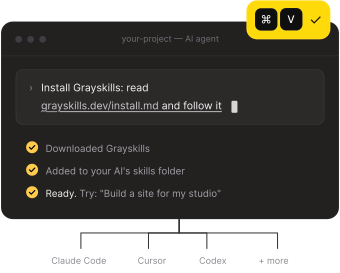
Paste one prompt. Your AI installs Grayskills itself. No setup, no terminal skills needed.
One install gives your AI the whole library. New skills appear automatically. Nothing to download one by one.
Paste one prompt. Your AI installs Grayskills itself. No setup, no terminal skills needed.
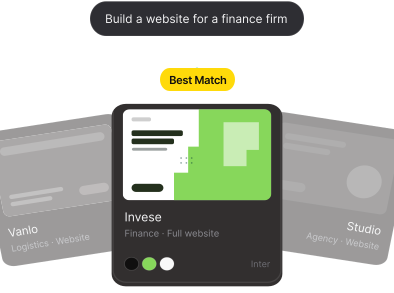
Ask for what you need. “Build a website for a finance firm.” Grayskills finds the right design and applies it.

Get a finished result. Exact fonts, colors, layouts and real assets, built in your project’s code and ready to edit.
Pick your tool. Copy the line. Your AI does the rest in about a minute.
Install Grayskills: read grayskills.dev/install.md and follow it
Install Grayskills: read grayskills.dev/install.md and follow it (save the rules in .cursor/rules)
Open any skill, press “Copy prompt pack”, and paste it as your first message
Already bought? Your AI opens a page in your browser. Click Approve and you’re connected. No key to copy. Manage devices in your account.
A skill is a small folder of design knowledge. This is what makes the result look designed, not generated.
Every colour, font size, radius and spacing value from the original design file. Your AI copies them, it never guesses.
Real, working pages to copy from: home, pricing, blog, dashboards, app screens. Not just rules.
Logos, icons, illustrations and photos exported from the design, so nothing is drawn from scratch.
Before building, your AI asks up to four quick questions about your brand. Skip any of them and it uses a smart default.
A list of every image slot with its size and a ready prompt, so your photos match the style too.
The same skill works in Claude Code, Cursor, Codex, Copilot, Gemini and Windsurf, with a prompt pack for web builders.
A design skill is a small folder your AI agent reads before it builds: exact colours, fonts and spacing, finished page code, real images and clear rules. Your AI follows it, so the result looks like a professional designer made it instead of the usual generic AI look.
Claude Code, Cursor, Codex, GitHub Copilot, Gemini CLI and Windsurf read the skill directly. For Lovable, Bolt, v0 or ChatGPT, every skill also ships a copy-paste prompt pack.
No. You paste one prompt and your AI installs Grayskills by itself. After that you just ask in plain words, like “Build a website for my bakery”.
One payment. Every skill we make, forever. Install it in under a minute.